A clear idea.
A traceable source.
A key idea from your notebook.[1]
REFERENCES & SOURCE PASSAGES“An exact passage from your source belongs here…”
NOTEBOOKLM → YOUR NEXT STEP
Take your NotebookLM notes into reports, presentations and study cards—with the source passages you can review.
v1.0.0 Beta · Manual installation · Exports generated on your device
A key idea from your notebook.[1]
REFERENCES & SOURCE PASSAGES“An exact passage from your source belongs here…”
Insight + source
Kept together
Illustration only. Sample text is not a real quotation or research finding.
ONE NOTEBOOK, MORE POSSIBILITIES
Review your sources, then move from notes to writing, presenting or studying.
Native footnotes, clickable citation numbers and a source appendix. Keep headings, lists and tables in an editable document.
.docx ↗Turn headings into editable slides. Full paragraphs and source passages stay in the speaker notes.
.pptx ↗Convert questions and definitions into Basic or Cloze cards. Source references stay on the back of each card.
.apkg + Rich CSV ↗CHECK FIRST. EXPORT SECOND.
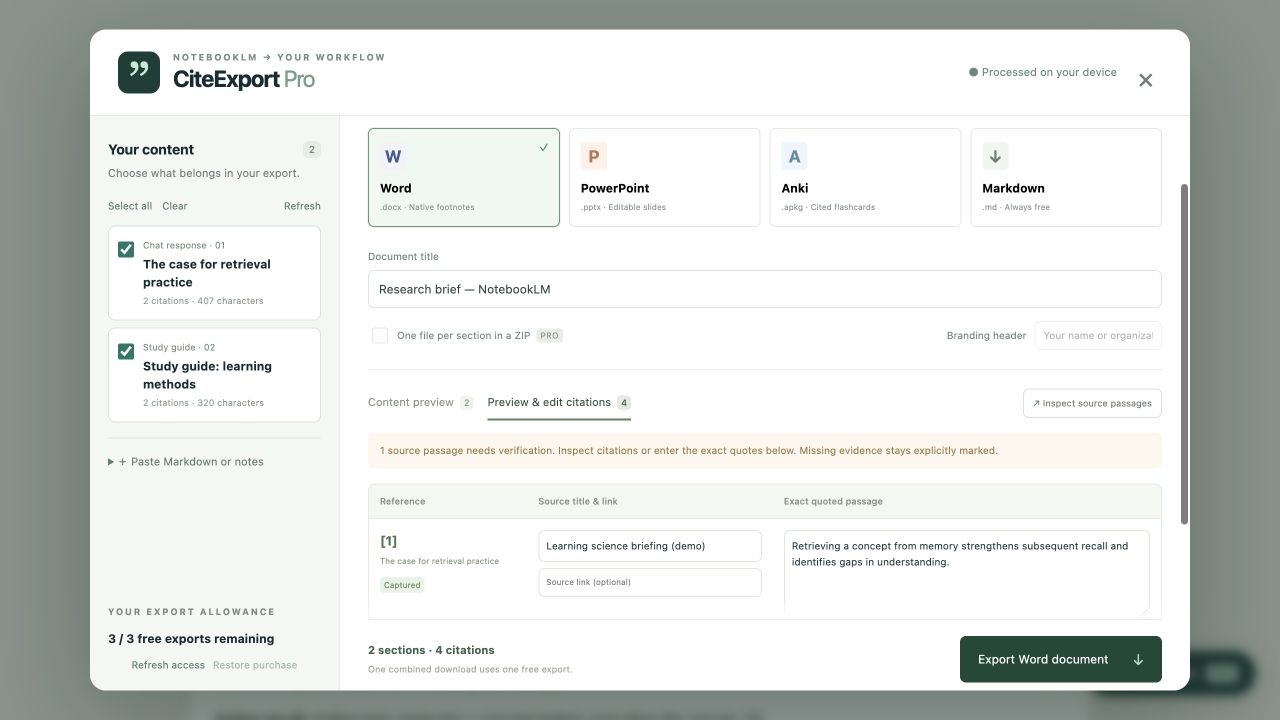
Select content → Inspect passages → Edit citations → Download your file.

The extension reads content loaded on the current page. When a source passage cannot be retrieved, it is marked Unavailable / Unresolved. You can add or correct it yourself; missing evidence is never invented.
MORE EXPORTS, WHEN YOU NEED THEM
Pro adds unlimited advanced exports, ZIP batch downloads and custom branding.
$9.90 USD · one time
Unlock Pro features for the lifetime of this product.
$3.99 USD / month
Pro access while your subscription is active. Manage or cancel through the billing page.
Paid checkout is not open yet. The current downloadable Beta includes three free advanced exports and unlimited Markdown.
START WITH THE BETA
This Beta requires manual installation. A Chrome Web Store release is not available yet. End-to-end compatibility with live NotebookLM pages still needs validation.
Word, PPTX, APKG and Rich CSV share three free exports. Paid purchases are not available yet.
Get the Beta ↓Unzip the extension into a folder you will keep on your computer.
Open chrome://extensions, turn on Developer mode, then choose Load unpacked. Select the folder containing manifest.json.
Refresh NotebookLM and click CiteExport Pro on the page. Select your content, review the sources, then export.
Open NotebookLM ↗Notes, citation edits and document generation are processed on your device. The extension does not send notebook content to a publisher server or language-model service. Export allowance records use Chrome sync storage. If billing is enabled in a future release, ExtensionPay will handle account and payment information. Read the privacy policy.
The extension can only read content that is loaded and accessible on the page. Expand the chat, Studio content or source panel you need, then inspect the passages. You can also add citations manually or paste Markdown.
The current download is a Beta package for manual installation as an unpacked extension. The Chrome Web Store version has not been published. This page will link to it when it becomes available.
Yes. Download the matching source code to review the build process and third-party license notices. The extension package also includes those notices.